Abstract Factory_
// "There is a driving force more powerful than steam, electricity and atomic energy: the will" - Albert Einstein
category ¿What does it consist of?
The Abstract Factory is a creational pattern that provides an interface for creating families of related or dependent objects without specifying their concrete classes.
Imagine it as a "megafactory" that groups several "mini-factories". Each mini-factory is responsible for creating a family of related products. The main advantage is that it ensures that the objects created by a factory are compatible with each other.
Practical Example: UI Themes
A classic use case is creating interfaces with different visual themes (e.g., Light and Dark themes). We need UI components (buttons, text inputs) that adapt coherently to the selected theme.
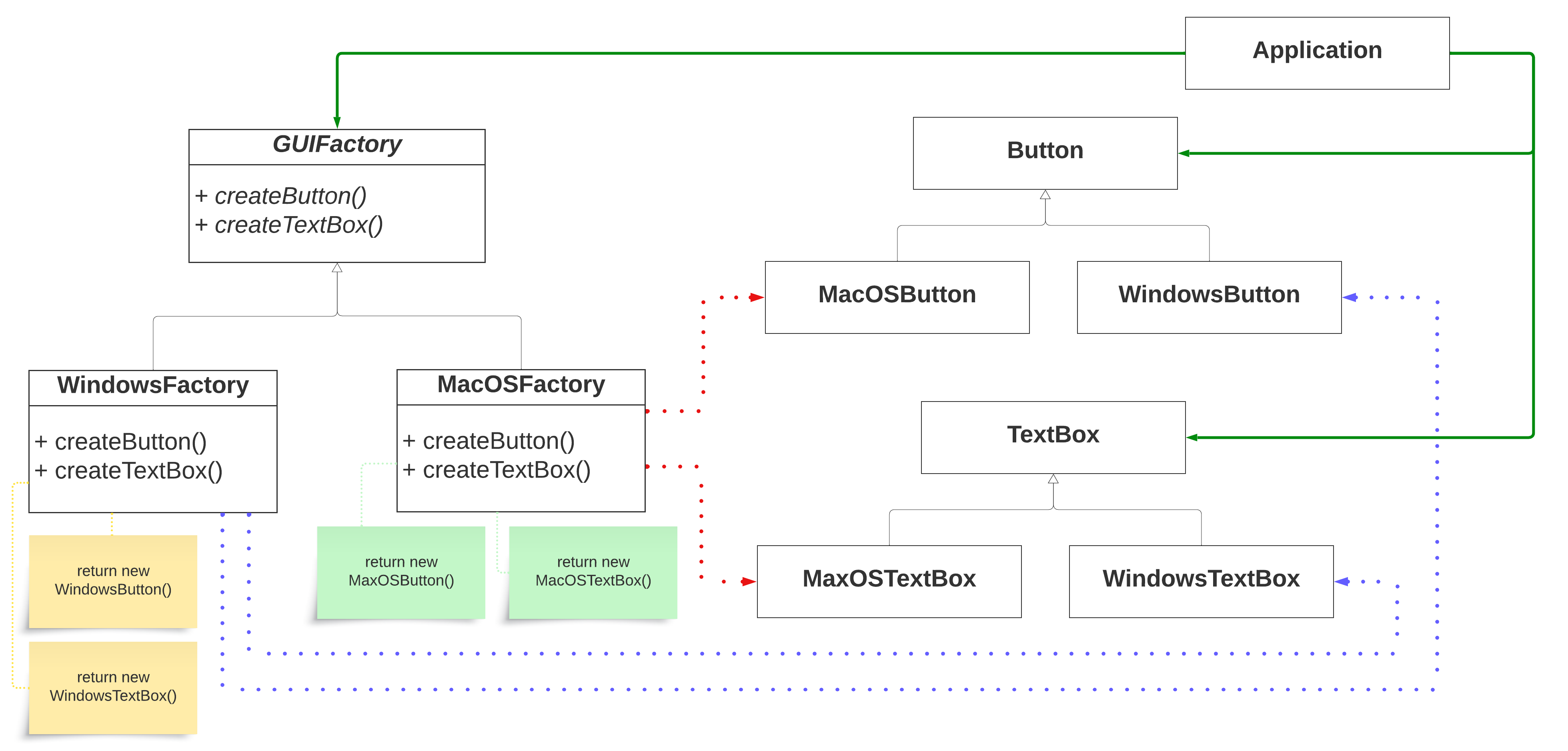
# The logic behind it
Instead of instantiating the UI components directly using new WindowsButton()
or new MacOSTextBox(),
we create interfaces for the families (e.g., GUIFactory)
and for the products (e.g., Button,
TextBox).
Then, we have concrete factories that implement GUIFactory
(like WindowsFactory
and MacOSFactory).
Each concrete factory is responsible for creating only the products that are coherent with its theme.
# Structure
# Implementation
<?php

// 1. Abstract Product Interfaces
interface Button {
    public function render(): void;
}

interface TextBox {
    public function input(string $text): void;
}

// 2. Abstract Factory Interface
interface GUIFactory {
    public function createButton(): Button;
    public function createTextBox(): TextBox;
}

// 3. Concrete Products for Windows
class WindowsButton implements Button {
    public function render(): void {
        echo "Rendering Windows style button\n";
    }
}

class WindowsTextBox implements TextBox {
    public function input(string $text): void {
        echo "Input '$text' in Windows style TextBox\n";
    }
}

// Concrete Products for MacOS
class MacOSButton implements Button {
    public function render(): void {
        echo "Rendering MacOS style button\n";
    }
}

class MacOSTextBox implements TextBox {
    public function input(string $text): void {
        echo "Input '$text' in MacOS style TextBox\n";
    }
}

// 4. Concrete Factories
class WindowsFactory implements GUIFactory {
    public function createButton(): Button {
        return new WindowsButton();
    }
    public function createTextBox(): TextBox {
        return new WindowsTextBox();
    }
}

class MacOSFactory implements GUIFactory {
    public function createButton(): Button {
        return new MacOSButton();
    }
    public function createTextBox(): TextBox {
        return new MacOSTextBox();
    }
}

// 5. The Client consumes the Abstract Factory
class Application {
    private Button $button;
    private TextBox $textBox;

    public function __construct(GUIFactory $factory) {
        $this->button = $factory->createButton();
        $this->textBox = $factory->createTextBox();
    }

    public function createUI() {
        $this->button->render();
        $this->textBox->input("Hello Abstract Factory!");
    }
}

// Usage
$os = "MacOS"; // or "Windows"
$factory = null;

if ($os === "Windows") {
    $factory = new WindowsFactory();
} else {
    $factory = new MacOSFactory();
}

$app = new Application($factory);
$app->createUI();
// Output:
// Rendering MacOS style button
// Input 'Hello Abstract Factory!' in MacOS style TextBox
We create specific implementations for each operating system:
class WindowsButton implements Button {
    public void paint() {
        System.out.println("Render a button in a Windows style");
    }
}

class MacOSButton implements Button {
    public void paint() {
        System.out.println("Render a button in a MacOS style");
    }
}

class WindowsTextBox implements TextBox {
    public void render() {
        System.out.println("Render a text box in a Windows style");
    }
}
The client (our Application
class) only depends on the abstract interfaces, allowing it to work with any concrete factory without
knowing the details of the specific products that are instantiated:
class Application {
    private Button button;
    private TextBox textBox;

    public Application(GUIFactory factory) {
        button = factory.createButton();
        textBox = factory.createTextBox();
    }
    // ...
}
# Mapping Participants
-
GUIFactory (AbstractFactory): Declares creation methods for each abstract product (Button, TextBox).
-
WindowsFactory, MacOSFactory (ConcreteFactory): Implement the creation methods of the abstract factory, creating products corresponding to their family.
-
Button, TextBox (AbstractProduct): Common interface for the different objects of the family.
-
WindowsButton, MacOSButton, WindowsTextBox, MacOSTextBox (ConcreteProduct): Specific implementations of each product for each operating system.
-
Application (Client): Uses the abstract factory to create and manipulate Button and TextBox objects.
# Conclusions
This example demonstrates the use of the Abstract Factory to create families of related objects (buttons and text boxes). This way we can easily switch between different implementations (Windows and MacOS) without changing the client code.
# Related Patterns
Factory Method
Abstract Factory classes are often implemented with Factory Methods.
Prototype
Abstract factories can also be implemented using prototypes.
Singleton
Concrete factories are often implemented as Singletons.