In this article, we start with the basics of programming: algorithms, the logic of programming. I will try to explain it in an easy and simple way so that it is clearly understood, with practical, everyday examples. Here we will start from sequential structures, the simplest ones.

# What are algorithms?
Programming consists of solving problems. So, in some way we must find and write the solution to these problems.
"An algorithm is a method for solving a problem".
Writing an algorithm is equivalent to writing the solution to the problem.
When programming, it is important to know this methodology since the algorithm will be transformed into our computer program.
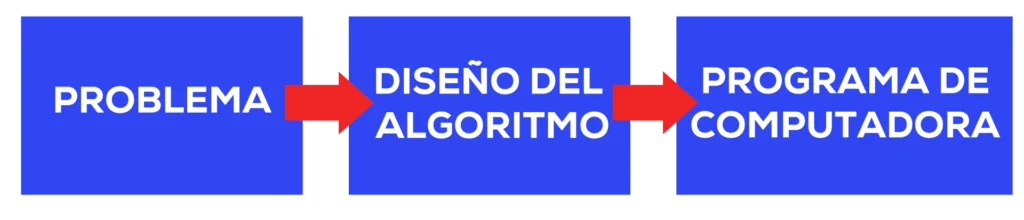
Going to specifics, we will define an algorithm as "a set of steps or instructions that are followed to achieve an objective".
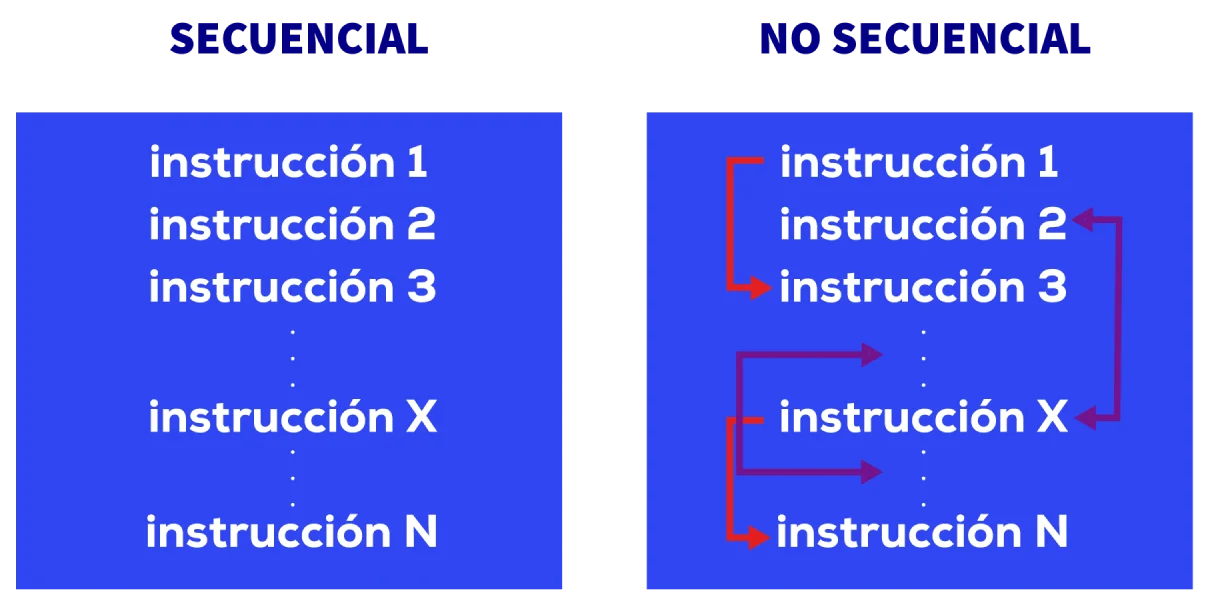
These instructions can be sequential or non-sequential.
# Characteristics
- These steps must be done in order
- We cannot leave anything ambiguous or to chance
- If we execute it twice we must obtain the same result
- It must have an end
- It can have input elements
- It generates a result, fulfills an objective
All these characteristics are usually summarized as follows: "an algorithm must be:"
- Precise (indicates the order of execution in each step)
- Defined (if followed twice, it obtains the same result each time)
- Finite (has an end, a determined number of steps)
# When do we use or create algorithms?
If we look at it outside the computational field, we use algorithms more than we think, for example:
- When explaining how to get to a place: "to get there, turn left, go straight for one block, turn right, and go 3 blocks ahead"
- When creating or using a cooking recipe. Here we have a recipe to create coconut balls:

- 01. INPUT data: Ingredients
- 02. The PROCESS is the method of elaboration, how to do it
- 03. OUTPUT data or RESULTS: Coconut balls
Let's notice that these three points are in every computational process: input, process, output, even in algorithms.
If we remove a step, or don't do it in order, we won't achieve the desired result; therefore, the algorithm will respond poorly. If we write the algorithm well, the program will achieve its objective.
The computer always executes in the same way (in principle), so if there is a problem, we must review our algorithm.
This is the most important thing: being able to think algorithmically about the solution to a problem, step by step, line by line. Everyone thinks or writes it with their own words, and when programming, translates it into the language they use (java, php, python), but the important thing is to be able to think it.
The language we use to build the algorithm is called pseudocode; it is not code defined by a standard, it is code that everyone has and can understand, and ideally, if someone else sees it, they can also understand it.
# Example: Algorithmic Thinking
Let's apply algorithms to a more abstract example, more oriented towards what we do when programming.
Let's create an algorithm to add two
numbers, for example:
4 + 8 = 12
We will think about it step by step; for this, I consider some cases:
4 + 5 = 9; 3 + 2 = 5; 8 + 1 = 9
These are two numbers that are added and return a third one.
An algorithm must be generic, work for all cases, so to make it generic, we are going to use some boxes.
Inside each box, we store a number, which we don't know what it will be, nor is it important. To identify them, we'll call them Box A, Box B, and Box C.
- Box A represents the first number.
- Box B represents the second number.
- Box C represents the result of the sum.
These boxes are VARIABLES; they store a value that can change. A and B are input data, and C is the output, result.
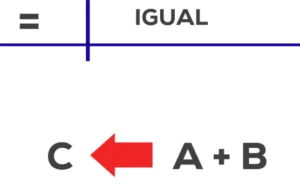
We are also going to need two elements to help us do the sum, the plus (+) and the equals (=). These elements are OPERATORS; they allow performing operations on the variables.
The entire algorithm or process could be:
- 01. We load a number into box A, giving value to the variable.
- 02. We load a number into box B, giving value to the variable.
-
03.
With the equals operator, we store the result of the operation
C = A + Bin box C, using the plus (Notice that it is not written as A + B = C, but as C = A + B, because equals, assignment, goes from right to left). - 04. We take the stored number out of box C to see its value; we see the value of the variable.
Each of these steps represents an instruction, a step in the algorithm.
This is the process we must follow for the sum; we've already thought it through, now we have to write it.
# Writing the Pseudocode
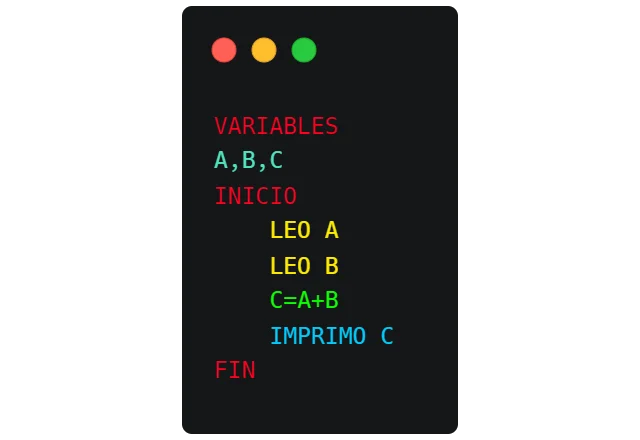
First, we saw that we had 3 little boxes, so we're going to declare these 3 boxes, variables, indicating to the algorithm that they exist and that it can use them.
VARIABLES: A, B, C
Now the process starts; we open a block indicating that we are going to write.
START
We must load the value into variable A, the first number. Do we know which one it is, what its value is?
NO, we don't know what it is, so the first step is to obtain it. We must ask the user in front of the screen to enter the first number; we will call this READ (LEO) A (we give value to variable A with what the user enters).
1st STEP) READ A
Do we know what the second number is? No, neither; so we have to get it, just as with A we ask the user to enter it, in this case B.
2nd STEP) READ B
I have to add the two numbers and store them somewhere; for this, we use the sum, assignment operators, and we store in variable C the result of the sum.
3rd STEP) C = A + B
Finally, we make the result appear on the screen; we call this PRINT, and the variable we want to show.
4th STEP) PRINT C
And finally, we indicate that we have reached the end of the block.
END
This is how it would be written in a cleaner way:
# Variables and Memory
As we saw, those little boxes used to store data are called VARIABLES, and we use them to hold the data we are going to use.
They are called VARIABLES because their value is not fixed. They will always have the last value that was loaded into them.
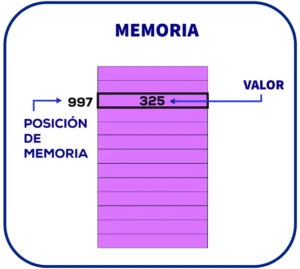
A variable can be seen in two ways: here we saw it as a box, which is the algorithmic point of view.
From a computational point of view, a variable corresponds to a memory location in which a value is stored.
Just as we have variables, we also have constants: little boxes whose value cannot change during the entire execution.
We use the word constant to declare them, and when we declare them we say what their value will be, for example:
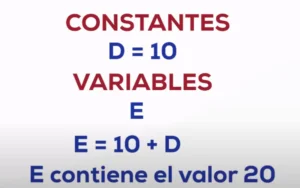
The constant D will always have the value 10, but it's as if it were a variable.
The advantage of constants is that they are much less costly than variables, and the algorithm is also more readable (when I talk about cost, I refer to time; the less time it takes, the better).
# Types of Variables
Variables and constants also have types (typed languages) for the value they can store. Not all languages are typed, but I believe it is better to learn it this way:
- integer: the variable can only store integer numbers
- decimal/float: decimal numbers or numbers with a decimal point
- character: for a letter or a single-digit number
- word, string: for a word or a set of characters; they are usually assigned within quotes
- boolean: it has a truth value: it is true or false
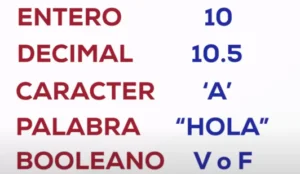
What is usually done is defining the variable and the constant with the type it has; thus, the algorithm is clearer.
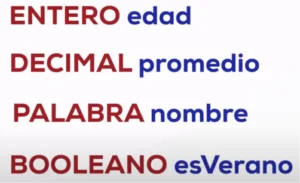
Representative names (variables and constants)
A good practice is to give variables names that are related to what they represent.
In the previous example, variable "c" (which contained the result of adding A and B) doesn't say much. However, if the variable had been named "result", one would understand when reading the code that it's storing the result of an operation.
The same for constants; for example, I can define the constant:
string COLOR_OF_THE_SKY = "blue"
# Instructions and Operators
We have several types of instructions:
- start/end
- assignment
- reading ? loading the variable
- writing ? printing a message/variable
- control ? we'll see later
Each instruction represents one or more actions in our algorithm.
An operator is a character or group of characters that acts on one, two, or more variables and/or constants to perform a certain operation with a certain result. There are operators of different types:
- Arithmetic Operators: Allow performing arithmetic operations.
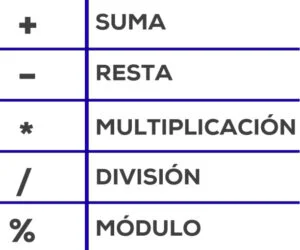
- Assignment Operator: Used to give a value to a variable.
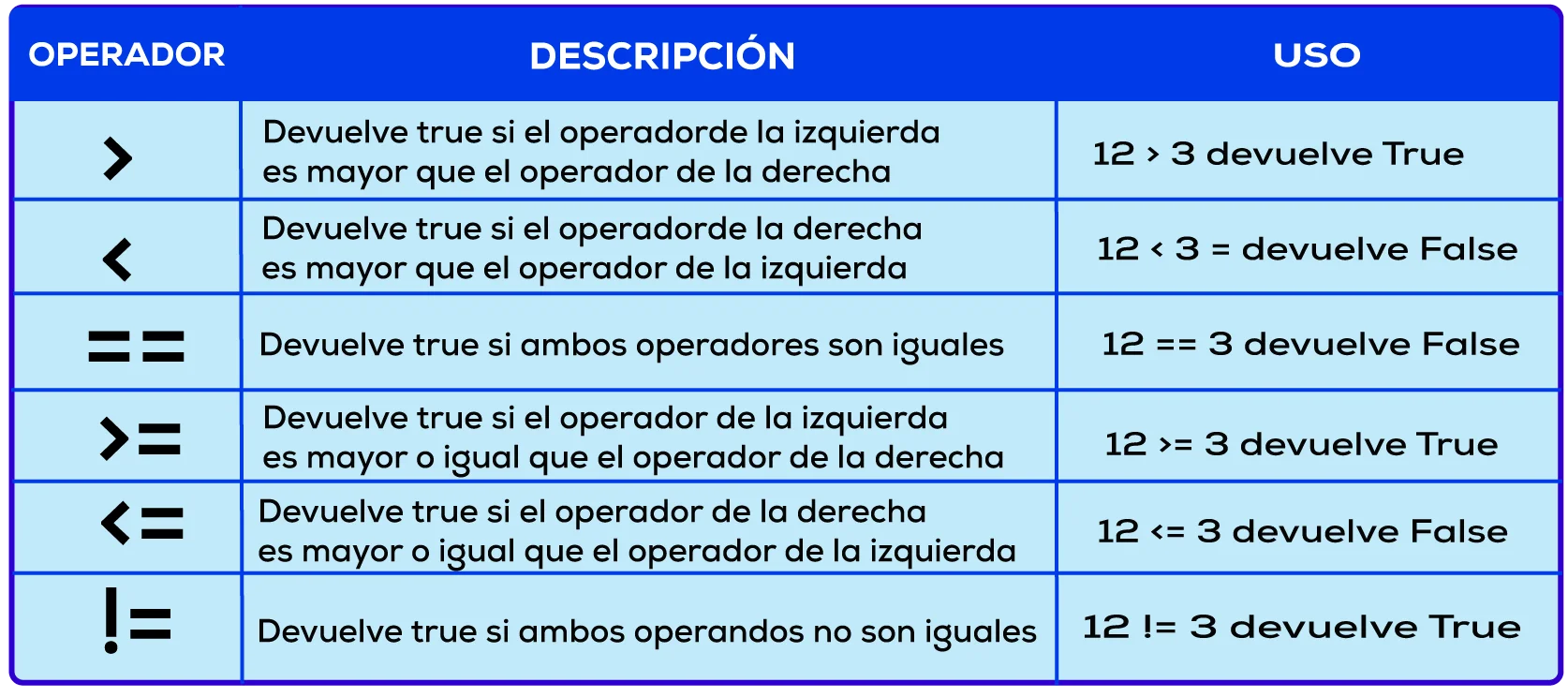
- Relational Operators: Used to compare two values. If the result of the comparison is correct, the considered expression is true; otherwise, it is false. This is called the truth value of the operation.
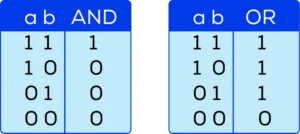
- Logical Operators: Used to work with multiple expressions, not variables. We have AND and OR, which have a value based on the values of the two expressions they join. There are truth tables for each of them. I mention them here, but we will see them in detail later.
# Let's do an exercise!
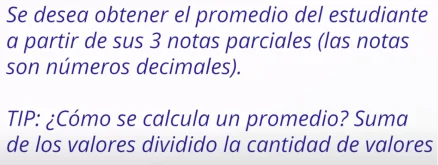
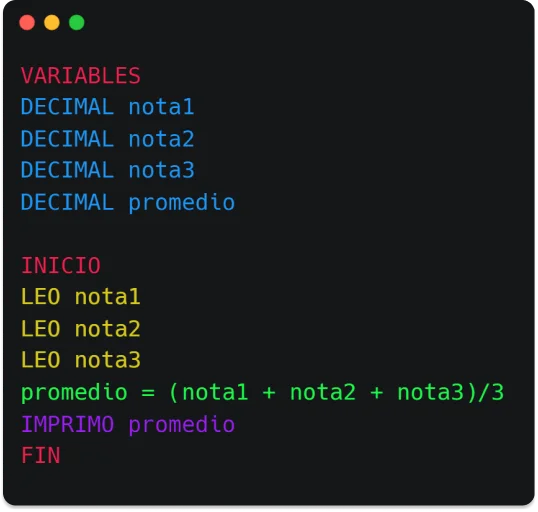
What variables are we going to have?
- the grades (3 grades, 3 variables)
- and the result, the average of all
Important: we suppose the grades are of decimal type.
What are we going to do?
- We load all the grades into the variables using the read instruction
- We perform the mathematical operation (sum the 3 variables and divide by 3) and store it; we assign it to the average variable
- Finally, we are going to show or print the average variable
This is how our algorithm will look:
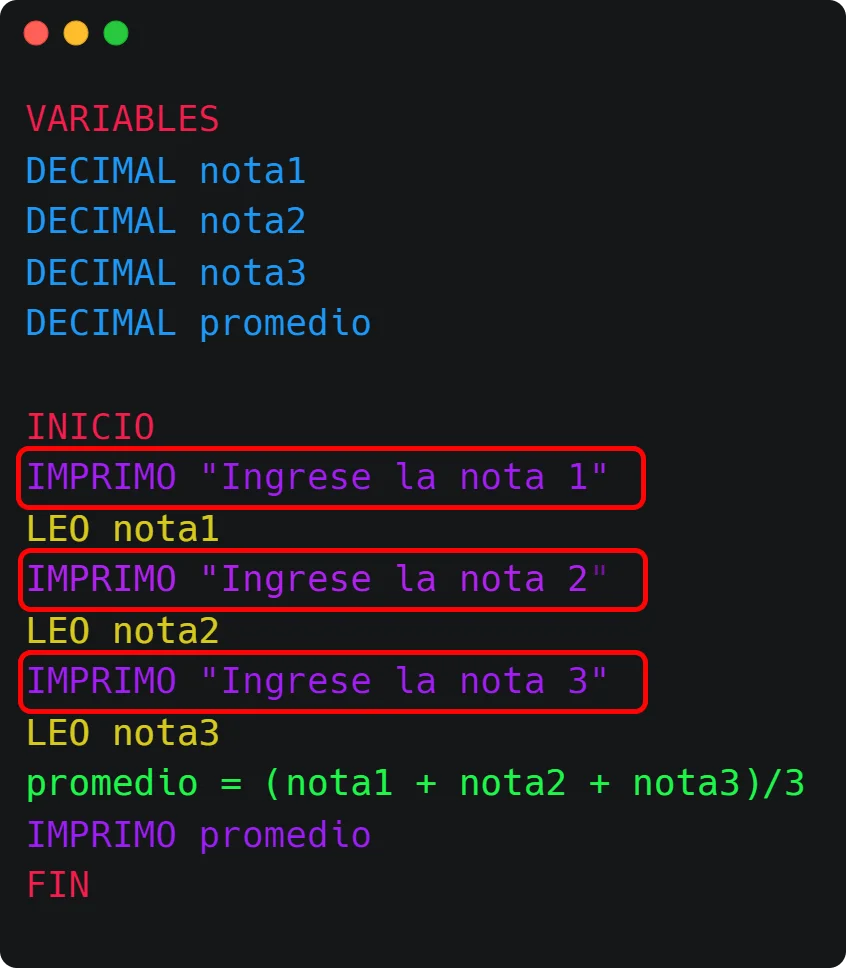
We can make it more complete by displaying a message to the user asking them to enter the values:
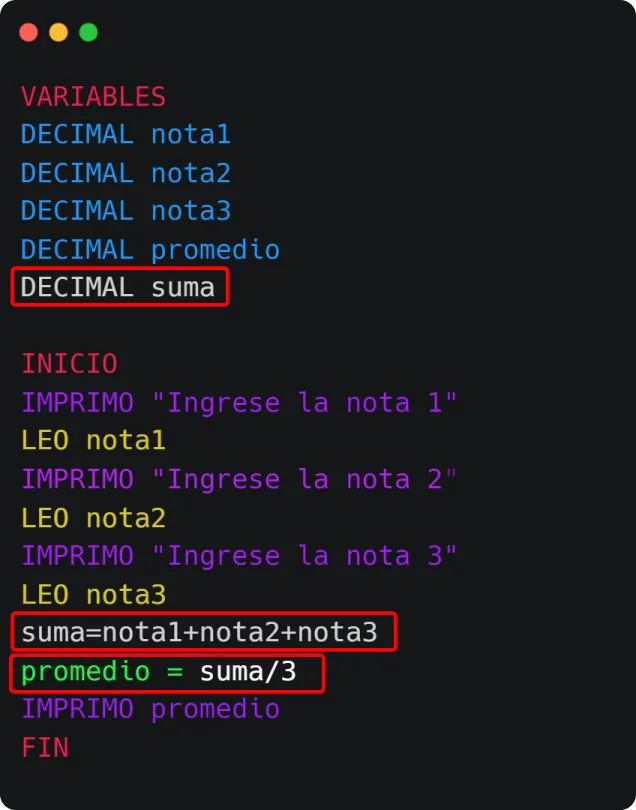
We could also use an intermediate variable to store the sum.
This is the beginning; we saw algorithms with sequential structure.
But before, since the only way to learn is by practicing, here are some exercises for you to practice and apply what you've seen:
LA FAROLERA FC wishes to obtain the amount of points they made in this tournament. Write an algorithm that allows entering:
- The amount of matches won (3 pts).
- The amount of matches tied (1 pt).
- The amount of matches lost (0 pts).
Pseudocode Solution:
VARIABLES
  INTEGER wonMatches, tiedMatches, lostMatches, totalPoints
START
  PRINT 'Enter the amount of matches won'
  READ wonMatches
  PRINT 'Enter the amount of matches tied'
  READ tiedMatches
  PRINT 'Enter the amount of matches lost'
  READ lostMatches
  totalPoints = (wonMatches * 3) + (tiedMatches * 1) + (lostMatches * 0)
  PRINT 'The team obtained: ' + totalPoints + ' points'
ENDDistance in nautical miles to meters (1 mile = 1852 meters).
VARIABLES
  FLOAT nauticalMiles, meters
CONSTANTS
  INTEGER MILE_IN_METERS = 1852
START
  PRINT 'Enter the distance in Nautical Miles'
  READ nauticalMiles
  meters = nauticalMiles * MILE_IN_METERS
  PRINT 'The distance in meters is: ' + meters
ENDCalculate the percentage discounted by comparing original price and paid price.
VARIABLES
  FLOAT originalPrice, paidPrice, discountPercentage
START
  PRINT 'Enter the original price of the product'
  READ originalPrice
  PRINT 'Enter the price paid for the product'
  READ paidPrice
  discountPercentage = ((originalPrice - paidPrice) / originalPrice) * 100
  PRINT 'The applied discount percentage is: ' + discountPercentage + '%'
END
In the next article, we will see selective or conditional structures that will allow us to alter the sequence, being able to go through one or other paths.